Start with the free 2-Series app and loaders. You do not need Patreon or Discord to mod your game. Patreon is an optional way to support development; the separate 3-Series build is for people who choose to support and try the newest work.
For ordinary modding, download the free 2-Series app and the loaders. No Patreon subscription or Discord membership is required. Choose the desktop app for Aurora Forge tools, or the loaders-only installer if you already have the tools you want.
Want the complete free source? Get the 2-Series all-source archive. The free line stays separate from the 3-Series.
Choosing the 3-Series? That is a separate optional build for the newest development work. Its access gate checks an active Patreon tier and linked Discord VIP role. You do not need it to mod your game.
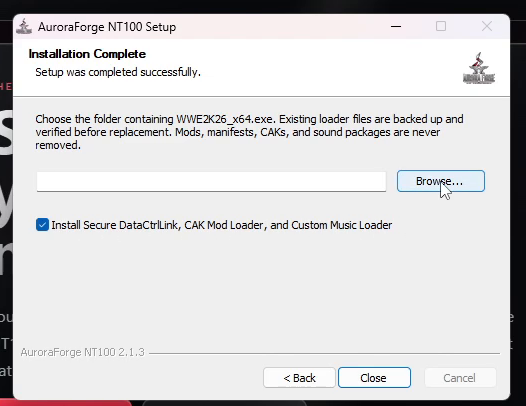
Only want WWE 2K26 mods to load? Use the loader installer for your line: 2-Series loaders (free and still usable) or 3-Series loaders. Both install Secure DataCtrlLink, the CAK Mod Loader, and the Custom Music Loader, and back up existing loader files first.
In-game mod manager: press F8 after the game opens. Up/Down selects a detected mod, Space toggles it, Enter saves to mods/mod-selection.json, and Esc closes. Changes apply on the next launch. F9 and F10 are fallback hotkeys. Use borderless/windowed mode; exclusive fullscreen can hide the topmost window.
No content gatekeeping: if you enable a CAK, the loader mounts it as provided. It does not inspect or filter payloads inside your CAK. Your files, your call.
OPTIONAL / 3-SERIES SUPPORTER BUILD
Install the newest development build.
The steps below are for the separate 3-Series build. You can skip this section and still install mods with the free 2-Series app and loaders above.
1
Get the installer from the website.
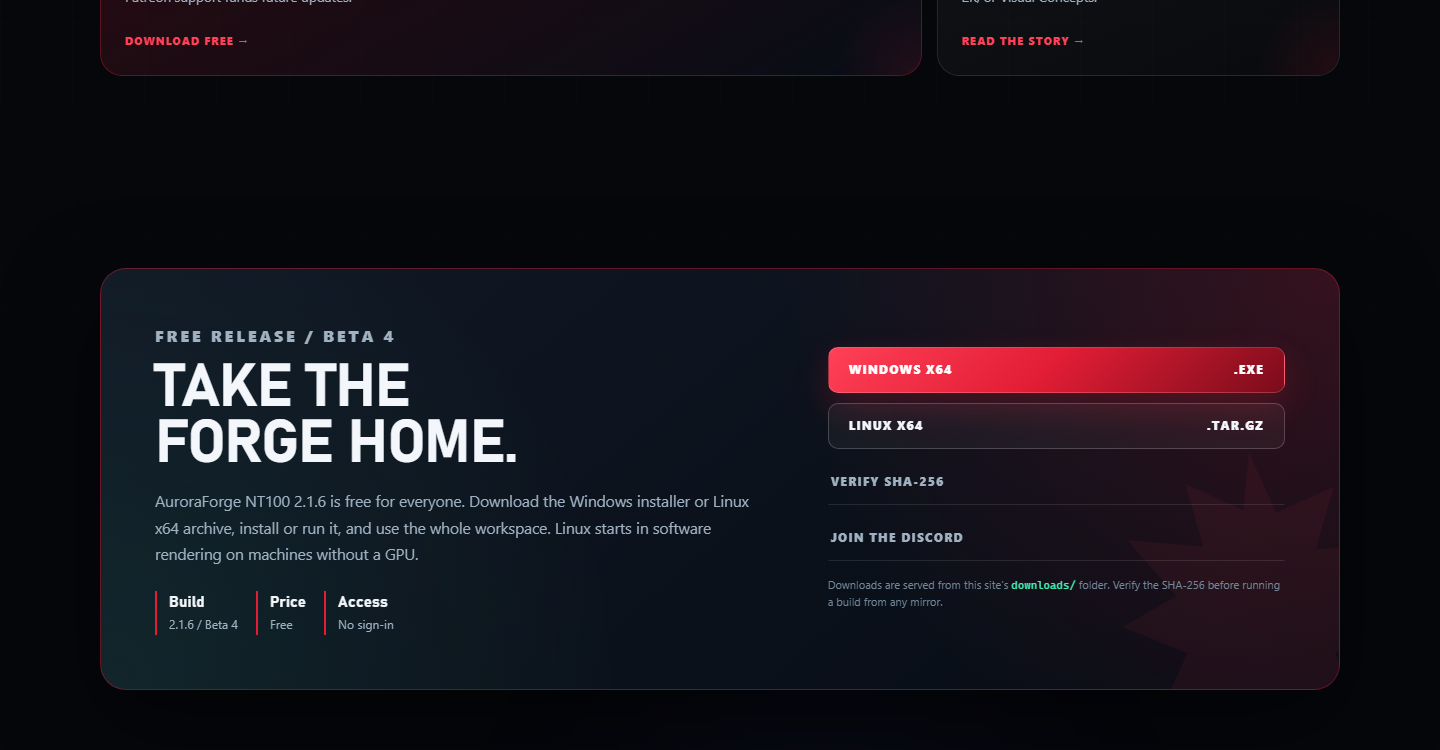
Open auroraforge.live. Click the Windows x64 button on the 3-Series page. That channel link always points to the current installer.
Use the website, not a random file-sharing link.
If you want to check it, the SHA-256 link is next to the download.
Click the red Windows x64 button. The Linux archive is below it.
2
Open the installer and finish setup.
When the download finishes, open it from your browser or double-click it in your Downloads folder. Follow the installer prompts and keep the default app install location unless you have a reason to change it.
Windows may ask for permission. Choose Yes. If you see a blue SmartScreen warning, click More info, then Run anyway. The installer is not code-signed yet, so Windows does not know the publisher.
The desktop app installer is separate from the game loaders. You do not need to choose a game folder to install the app.
Do not use “Extract†on the .exe. Double-click it. It is an installer, not a ZIP file.
Installer screens can change; follow the current prompts.
3
Install game loaders separately if you need them.
The app installer does not install game loaders. If you want Aurora Forge loaders, run the separate 3-Series loaders installer.
Close WWE 2K26 before installing loaders. The loader installer backs up files it replaces; it does not delete your mods, CAKs, manifests, or sound packages.
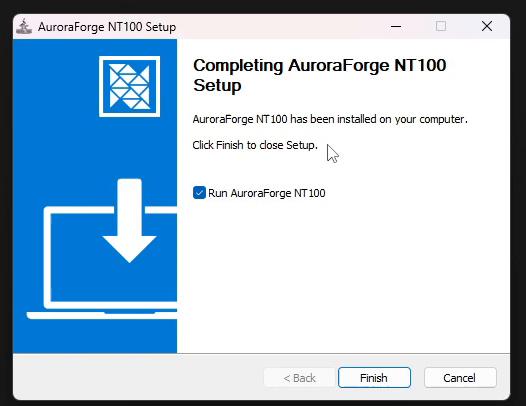
After installation, open AuroraForge NT100 from the Start menu. Your projects and settings stay on your PC when you close it.
Leave “Run AuroraForge NT100†checked, then click Finish.
4
Verify access with Patreon and Discord.
On first launch, AuroraForge 3-Series opens the access gate. Click Sign in with Patreon to Verify Access. Your browser opens the secure verifier.
Both checks must pass: an active Patreon tier and the Discord VIP role linked to that Patreon account. The app stores a verified session for this release, so you do not sign in on every launch.
AuroraForge 3-Series access
Sign in with Patreon to verify access.
Active Patreon tier + linked Discord VIP role required.
The access gate opens before the workspace. Both checks must pass.
On Linux: the free 2-Series build is available as a Linux x64 archive from the buttons above. Download it, extract it, and run the AuroraForge NT100 executable. The optional 3-Series Linux build has its own Patreon + Discord verification gate.
PART TWO / UPDATING THE APP
Update the 3-Series build.
For the latest 3-Series build, use the Windows or Linux download buttons on the 3-Series page. You do not need to remove an earlier app first. Projects and settings stay on your PC.
Updating from 2.2.0 or older? Download and run the current free 2-Series Windows installer once. Older builds use a different update feed and cannot discover the new 2-Series channel automatically. Future 2-Series updates use the new public feed.
Close WWE 2K26 first if the update installs loader files. The installer refuses loader changes while the game is running. The app can still download the update while the game is closed.
5
Click Help, then Check for Updates.
Open AuroraForge NT100. At the top of the window, click Help. Click Check for Updates.... The app asks GitHub whether a newer version exists.
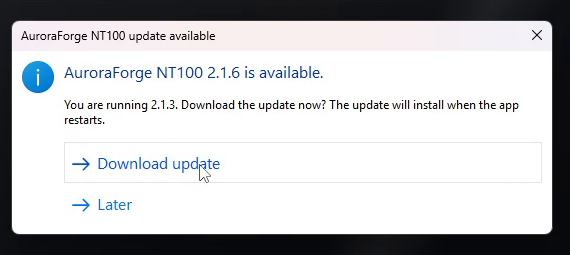
If you are already current, it says so. If a newer version exists, a box like the picture appears.
Click Download update. “Later†does nothing and keeps your current version.
6
Download, then restart.
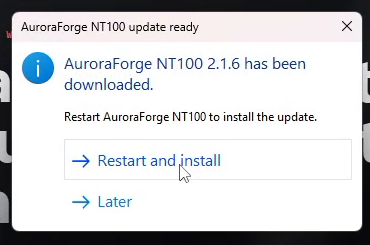
Click Download update. When the download finishes, the app asks you to restart. Click Restart and install.
The app closes for a moment. The installer runs, then the app opens again on the new version.
Click “Restart and install.†The update installs on the restart.
7
Close the update installer.
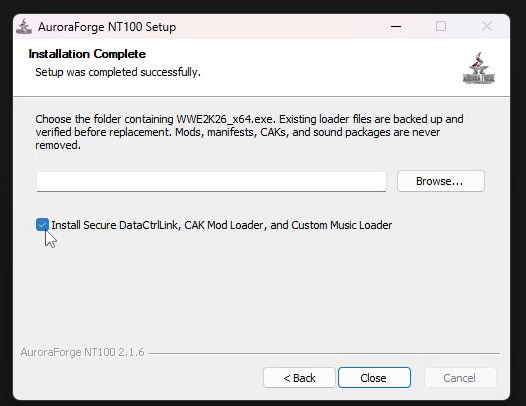
The update installer may ask for the game folder again. It should remember the path. Check it, leave the loader box set the way you want, then click Close or Finish.
Open the app and check the build number in the About page or the build chip. This guide is written for 3-Series Alpha.
The update uses the same installer. Your existing projects are not removed.
If Check for Updates says you are current: you already have the newest version. If you want to reinstall or move to another PC, use the website download. Installing over the old app is safe for projects and settings.
IF SOMETHING GOES WRONG
Small problems, simple answers.
Most install problems are Windows trust prompts, a missing game folder, or WWE 2K26 still running. The app does not need Node, npm, Python, or a command window.
Windows says “unrecognized appâ€
Click More info, then Run anyway. The installer is currently unsigned. Verify the SHA-256 from the website if you want to check the file first.
It says WWE 2K26 is running
Close the game completely, then try the loader install or update again. The app can be open while you download the update, but the game should be closed when loader files are replaced.
I cannot find WWE2K26_x64.exe
Open Steam, right-click WWE 2K26, choose Manage, then Browse local files. Use that folder. Do not choose the folder above it.
I do not want the loader
Clear the loader checkbox before closing the installer. The app still installs normally. You can add the loader later by running the installer again.
I need to update but the app says it is current
You are already on the latest build. If you need to repair the install, run the current installer from the website over the old one. Projects and settings are kept.
Where are the source and older builds?
The free 2-Series source is on the Source page. Both release lines are on the Downloads page. The GitHub Releases page carries the updater files and release notes for the 3-Series line.